Extreme TMA Line Indicator MT5
Platform: MT5 Type: Channel Last update: December 24, 2025The Extreme TMA Line Indicator for MT5 is responsible for displaying a price channel. It helps traders to understand trend direction and defines dynamic support and resistance levels.
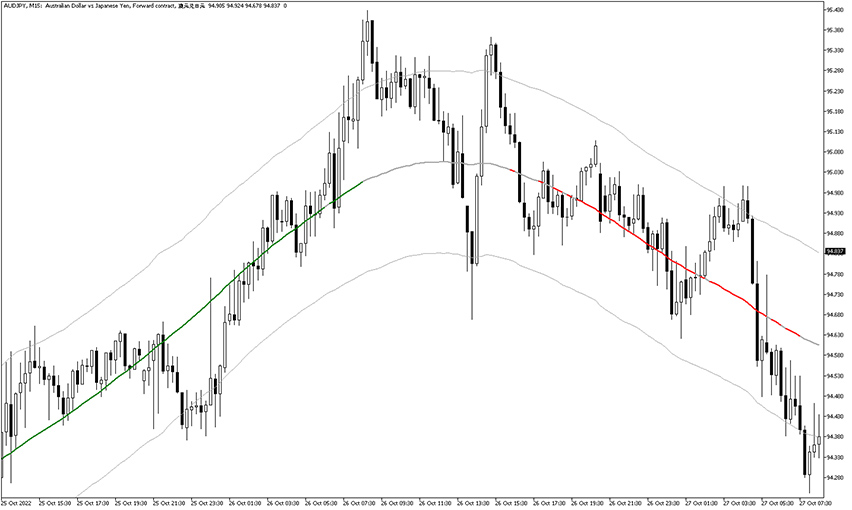
This is how it looks after activation in MetaTrader 5 platform.
Example chart:
How to use the Extreme TMA Line Indicator for MT5?
As you can see, it consists of two bands and a colorful central line.
The trend color readings should be considered as follows:
- green TMA – reflects bullish trend
- red TMA – suggests bearish trend
- gray TMA – neutral setup (flat market or trend indecision)
Trading rules
For buy trade opportunities, the extreme TMA line should be consistently green, and price should bounce off the lower channel band. A conservative take-profit (TP) level is the middle line, with the option to trail the trade toward the opposite band.
For sell trade setups, look for a sustained red extreme TMA line accompanied by price reacting at or failing to break above the upper channel band. Initial profit can be taken at the midline, while more aggressive trades may be managed by trailing price toward the lower band.
Real-life examples
Take a look at this GBP/USD H1 chart.
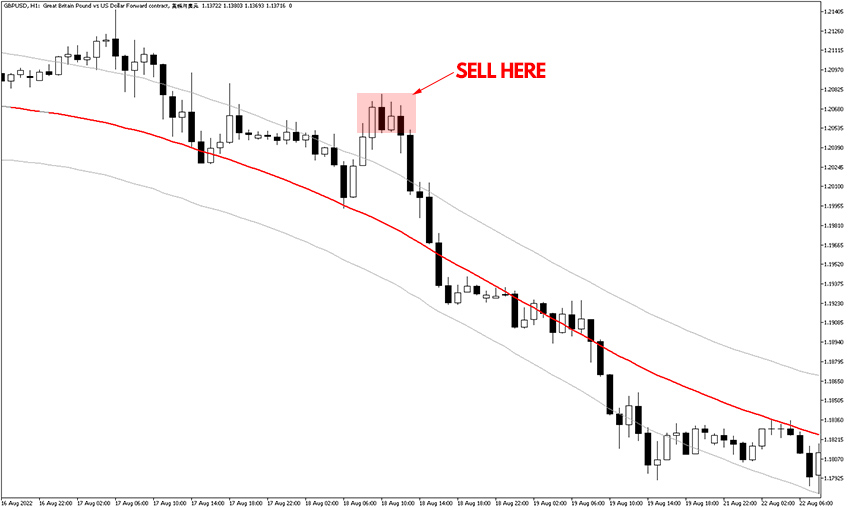
The steep slope of the channel reveals there was a strong downtrend. A good opportunity occurred when the price made an upward pullback and then price action indicated continuation in the original direction.
It resulted in excellent risk to reward ratio.
Indicator settings
In the settings tab one can customize five options:
- TMAPeriod – sets the value of the triple moving average period (default value: 45).
- ATRPeriod – sets the value of the ATR’s period (default value: 100).
- ATRMultiplier – sets the value of the ATR’s calculation (default value: 1.272).
- TrendThreshold – sets the value of the trend (default value: 0.5).
- Redraw – enable or disable redrawing the signals by getting new data (default value: true).
Bottom line
The Extreme TMA Line Indicator for MetaTrader 5 is a good piece of trading tool, but users need to test “redraw” option enabled and disabled as it impacts the trading signals generated. Our experience shows that turning it off makes the channel less smooth, but the signals are more reliable.